Blog

How to Make DIY Models to Enhance Your Drawing Skills

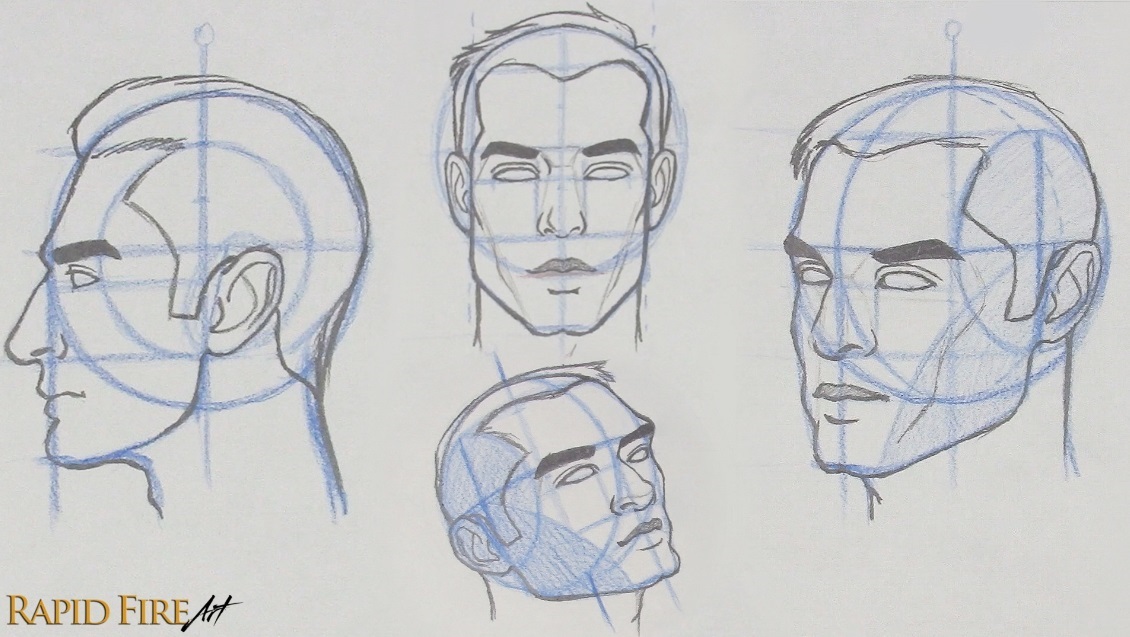
Are you good at drawing facial features from the front or side but struggle with other angles? Today I’m going to share a quick and fun DIY method for making simple 3D models that you can move around to explore facial features from any angle. These are very rough models, just enough to help you think through placement and structure when reference photos aren’t available. You’ll still want to study real faces to draw them realistically, but this can make certain angles a lot easier to wrap your head around.

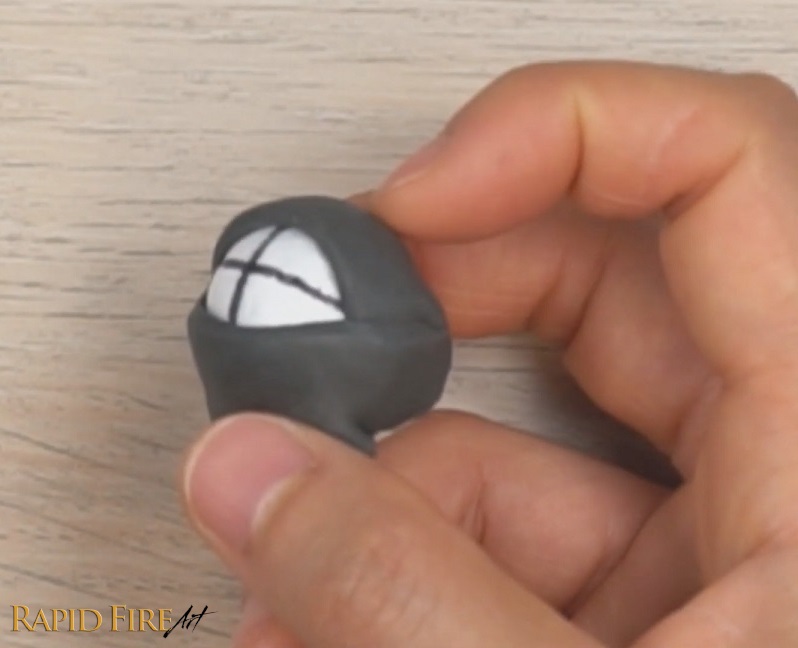
This eye model was made using a kneaded eraser.

If you don’t have any molding clay, Play-Doh or even a kneaded eraser, you can follow the recipe below to create something that feels similar to Play-Doh. If you already have molding clay, you can skip the recipe section and go straight to the section on how to form a 3D eye, nose, and head model.

Simple Non-Toxic PlayDoh Recipe

To make this non-toxic Play-Doh from scratch, you’ll need:

In a small bowl, mix the salt and flour well. Then add the dish soap in and mix again. You can add a few drops of food coloring if you like. Once the mixture starts clearing the sides of your bowl, feel free to get in there with your hands for a more thorough mix. I found this recipe just right for me, but since it’s likely we won’t be using the exact same ingredients, here are some troubleshooting tips for you:

  1. Mixture too dry? Add more dish soap
  2. Too wet? Add more flour
  3. Too crumbly? Use less salt

Our goal is to get a consistency that is easy to shape without falling apart, crumbling, or being overly sticky. Here’s a test! Can you create a pointy tip (like the end of a witch’s hat) without it falling apart? If it’s falling apart now, it will become worse as you play with it because exposure to air will dry it out further.

Notes: The salt acts as a preservative, so you can keep this Play-Doh in an airtight container for a few months without it getting moldy. Avoid using oil as a substitute for the dish soap because it can actually ruin your drawing if it comes in contact with your paper, even just briefly.

How to Form 3D Models of Facial Features

Making a 3D Eye Model

  1. Create the Eyeball: Roll a piece of Play-Doh into a ball and set it aside.
  2. Create the Eyelids: Roll another ball around the same size as the first one and flatten it down (don’t make it too thin or else it will be difficult to peel off your work surface. 3mm to 4mm worked nicely for me). Cut it in half using a straight edge such as a ruler or butterknife. These halves will be the top and bottom eyelids.
  3. Assemble the Eye: Place the two lids onto the ball, leaving a football-shaped opening to form the eye. Pinch the two lids together so they stay put.

Think of this model as a sketching aid. Rotate it, explore an angle, then translate that view directly into your drawing. It was very helpful for me when practicing the Loomis head drawings.

Making a Nose Model

  1. Create the Base: Form a wedge shape with a trapezoid at the bottom.
  2. Add Nostrils: Attach two round pieces on the sides for the nostrils. Press them in until they look more like half-spheres.

A blocky model like this trains your eye to think in 3D rather than copying outlines and makes proportion or orientation errors easier to spot and fix. Keep it next to your desk as a handy reference tool.

Making a Model Head

  1. Prepare the Base: Make a ball using your play-doh or better yet, a styrofoam ball and pierce it with a toothpick through the very center.
  2. Mark the Lines: Draw a vertical and horizontal line around the ball, ensuring they form a 90-degree angle and that the vertical line goes through the North and South Pole.

These lines help inform where facial features should go when the head is tilted at any angle. Find out more by exploring my tutorials on drawing the head.

You can also convert this into an eye model to help with positioning your pupil correctly (the vertical and horizontal line marks the position of the pupil).

how to make an eye model for drawing reference

Using Your Drawing Models

These models are simplified representations of facial features and the head. They can help you understand how features might look from challenging angles, especially when your reference image isn’t clear or available. Rotate the model to study foreshortening and observe how planes shift or disappear from view. This kind of practice helps build a mental library for drawing from imagination, but it doesn’t replace studying real faces.

Maintaining Your Play-Doh

If your Play-Doh starts to dry out, remove hardened or flaky bits and then knead it well. Store it in an airtight container or Ziploc bag to keep it usable for months. For a longer-lasting alternative that doubles as an eraser, check out my tutorial on how to make putty erasers from common household items.

Hope you had as much fun making these as I did!

Darlene

How to Make DIY Models to Enhance Your Drawing Skills Read More »

How to Make a Kneaded Eraser | EASY

How to Make a Kneaded Eraser

This is my favorite type of eraser. It can be molded into any shape to erase even the tiniest detail in a drawing – you just need to dab and lift. No rubbing required.

Kneaded erasers are quite affordable, but since we’re all in Covid-19 lockdown right now, you may not even be able to buy one. So here’s how you can make it yourself, out of tools that you can probably find around your house.

How to Make a DIY Kneaded Eraser Putty At HomeYou can make a kneaded eraser out of pretty much any solid eraser that you have, even the one on the end of a pencil, just by rubbing it on a piece of paper to create crumbs and then kneading the crumbs together into a putty.

Make sure you knead the putty very well until it becomes one single piece that can be molded into different shapes.

But the results will be varied because some erasers just crumble instead of stick together no matter how hard you work it. But don’t worry, I will show you how to fix that!


I tested a total of 10 different erasers and they can all be turned into putty/kneaded erasers, some work better than others, though.

This white Paper Mate eraser (pictured below) was immediately usable after just a few seconds of kneading. It became a perfect eraser putty that held its shape well no matter how I molded it. If you also experience that with your eraser, you’re good to go! You can skip straight to the section titled “Extra Tips for Making a Kneaded Eraser”. If that’s not your experience, please continue reading…

How to Make a DIY Kneaded Eraser Putty At Home


How to Make Eraser Putty from a Super Crumbly Eraser

If your eraser is super crumbly no matter how much you knead the crumbs together, we can still make it work. We just need to add a few more steps to the process.

How to fix a crumbly eraser All you have to do is add something sticky to make the crumbs stay together. The best way to do this is to rub your eraser along the sticky side of masking tape, painter’s tape, or the sticky part of a sticky note.

Just rub your eraser along the sticky side until the sticky stuff or adhesive comes off and is incorporated into the eraser crumbs. This works well with tape that isn’t too sticky. Masking tape works perfectly. I wouldn’t use duct tape for this.

If the consistency is way too sticky for your liking, you can always add some dry eraser crumbs until the consistency is just right for you. A test that I like to do, is to see if I can easily roll the putty to a point and also flatten it down without it changing shape or crumbling.

Incorporating dry eraser crumbs into a sticky piece of putty

If you don’t have any tape, just go around the house looking for stickers that are easy to peel off like barcodes or labels that you don’t need. Some water bottles will have adhesive under the label!

I would not recommend using liquid school glue because once the glue dries, the eraser becomes totally solid and unusable. Glue sticks on the other hand will work okay, but it’s not as sticky as I’d like it to be.


If your crumbs DO stick together when you work them between your fingers, but the putty isn’t quite soft enough for your preference or it’s a little crumbly, you can either…

Method #1:

Use tape adhesive to make it softer.

Just rub your eraser along the adhesive a few times and then gather the softer putty and mix it with the hard or crumbly one.

Keep doing this until it’s soft enough for you. Here’s a comparison between a piece of putty before and after adding the adhesive. As you can see, it fixed our crumbly issue and it’s more pliable and more putty-like now.


Method #2:

The other solution is to try erasing a bunch of pencil scribble marks and then kneading your eraser to incorporate that graphite into it.

After a while, this will help the putty become softer, more pliable, and more effective at erasing.

It’s normal for the putty to become grey, as it takes on the color of the graphite particles. This is also how you can break in a brand new store-bought kneaded eraser.


Now, every eraser and adhesive will give you different results, so experiment with your own recipe to come up with something that works for you. Keep in mind that the more you erase with your newly made putty, the more effective and pliable it will become.


I prefer a fairly sticky eraser because it can easily pick up graphite with just the slightest touch, so I can work on very detailed areas of a drawing. Keep tweaking your eraser recipe and testing how well it can erase until you’re satisfied. Do keep in mind that some erasers work a lot better than others at picking up graphite. So I’d recommend trying this with a few different types of erasers.


What type of Solid Eraser Works Best?

I was able to convert ALL the erasers that I tested into actual working kneadable erasers.

Some worked perfectly right after I kneaded them, others required different amounts of adhesive added to them because they were either not soft enough, not sticky enough, or they were too crumbly to begin with.

Even extremely crumbly erasers like the Pink Pearl can be converted into a kneadable eraser.

The ones that I found worked best were these:

In putty form, they’re able to hold their shape when molded and pick up graphite easily using the dabbing technique.


Here are my RESULTS with each eraser that I tested:

Notes: I judge how good each eraser is by how well it erases (how many dabs it takes to erase something), how well it holds its shape when I mold it/when I use it to erase something. Erasers ranked as mediocre are still viable, they’re just less effective to work with (eg: it may require more effort to erase with)

1. Sakura Latex-Free, Non-PVC Eraser
Quick to knead. Doesn’t require adhesive. Makes a great kneaded eraser.

2. PaperMate PVC-Free Eraser
Quick to knead. Doesn’t need any adhesive. Makes a great kneaded eraser.

3. Tombow Mono Plastic Eraser
Quick to knead. Somewhat crumbly. Needs some adhesive or graphite to soften it up. Makes a great kneaded eraser. Will become stiff when it cools back down from the warmth of your fingers, so it requires kneading before use. You can use this to your advantage, though – using it as both a solid eraser and putty eraser. It can hold its shape extremely well for erasing the tiniest areas.

4. Pentel Hi-Polymer Eraser
Quick to knead. Somewhat crumbly putty. Needs some adhesive to fix crumbliness. Makes a good kneaded eraser.

5. Dixon HB Pencil from dollarstore, latex-free
Takes some effort to knead. Not crumbly, but feels drier than all the solid erasers listed above. Works better without adhesive, but it is quite stiff. Makes a good kneaded eraser after you mix it with some graphite.

6. Random white eraser from an old pencil case.
I probably haven’t used it in like 12 years (It was so stiff that it didn’t even feel like rubber. It still worked anyway. I was able to quickly form it into a putty without any adhesive. Makes a good kneaded eraser.

7 & 8. Paw Patrol Erasers from dollarstore
Quick to knead. Crumbly putty. Needs some adhesive. Makes a good kneaded eraser.

9. PaperMate Pink Pearl Latex/PVC-Free Eraser
Extremely crumbly. Needs a lot of adhesive to become putty. Makes a mediocre kneaded eraser because I need to dab many times to erase.

10. Studio HB Pencil from the dollar store
Extremely crumbly. Needs a lot of adhesive to become putty. Makes a mediocre kneaded eraser because it requires so much adhesive, that it becomes difficult to mold into certain shapes without sticking to my fingers. If you don’t need it to erase hairline marks, it will do a good job.


Extra Tips for Making a Kneaded Eraser

Tip #1:

As you erase more and more (incorporate more graphite into your putty), it will become softer and more effective at erasing. That’s a good way to soften a stiff piece of putty without having to add any adhesive. It’s also a good way to break in a brand new store-bought kneaded eraser. It’s normal for the putty to turn grey, as it takes on the color of the graphite particles.


Tip #2:

The more eraser crumbs you make, the bigger your eraser will be, of course, but it’ll take hours and a lot of hard work to turn a large eraser like this into a big pile of crumbs. A safe way you can speed up the process is by using a more textured surface to rub your eraser on. Here, I’m using the side of my textured mechanical pencil:

I’ve been asked many times if a cheese grater can be used. While you can use one, it can be very dangerous, so I don’t recommend that.

And that’s how you can make a kneaded eraser at home! Which by the way is my favorite type of eraser. I hope you enjoyed this tutorial. If ya did, please share it with your friends and leave a comment down below to let me know your results!


How to Make a Kneaded Eraser | EASY Read More »

Inktober 2017 – My Submissions

If you haven’t heard of Inktober, it’s a fun challenge started by Jake Parker, where you try to draw everyday in the month of October using ink!

I decided to join in on the fun even though I’m most comfortable working with graphite. And I encourage you to join in as well! I think a great way to grow any skill is to constantly challenge yourself by stepping outside of your comfort zone.

Anyway… drawing is drawing – it doesn’t matter what medium you use!

[td_block_ad_box spot_id=”custom_ad_3″]

With my current work schedule, I decided to make a drawing every other day. You can follow me on Twitter to catch me when I post the next one all the way up until Oct 31st! Tweet at me if you’re participating as well! I’d love to see your submissions!!

The most challenging thing about Inktober is that there’s no ERASING! So to up the game even more, I’ll try NOT to use pencil for under layers/rough drafts, etc. Just plain ink on paper.

Here are my submissions so far!

October 1: Robert Downey Jr.

Time: 46 mins

Did this on the Wacom Intuos Pro Paper tablet. It was so fun!! It was a bit of a challenge coloring the portrait because the pen has a 0.4mm fine tip. I got the proportions all wrong and couldn’t erase anything, but still proud that I got my first one done!

October 3: Iron Man & Pepper Potts

Time: 1 hr 10 mins

Huge obsession with Iron Man…

I used Pigma Sensei Pens for this one. The most difficult thing was shading Pepper’s skin, although I think it turned out okay in the end. In areas where I messed up, I used a thick 0.6mm pen to outline it so the mistakes would disappear.


October 5: Drogon Wight

Time: 40 mins

Inspired by Ertaç Altınöz’s digital drawing.

October 7: Bran (Three Eyed Raven)

Time: 45 mins


October 9: Arya Stark

Time: 39 mins

This one was really fun because of the greasy hair. Shading is awful though…


October 11: Hodor Hodoring

Time: 1 hr 20 mins

So frustrated with myself because the drawing didn’t turn out the way I wanted, but I decided to post it anyway… gotta show my fails too!

October 13: Tyrion Lannister

Time: 2 hrs 23 mins


UPDATE: This is where I stopped. I was staying up past 2am to do these and it turns out that was really bad for my health. I got really painful stomach aches which didn’t go away until after a week and other health issues started to resurface, so I decided to not to continue. It was fun, but I just didn’t have time for it!


Here’s my entire list of ideas:

1.) Robert Downey Jr.
2.) Iron Man
3.) RDJ and Miss Potts
4.) Wolverine
5.) Wonder Woman
6.) Lara Croft
7.) Indiana Jones
8.) Khaleesi
9.) Jon Snow
10.) Tyrion Lannister
11.) Arya Stark
12.) Sansa Stark
13.) Jaime Lannister
14.) Jora Mormont
15.) Samwell Tarly
16.) Dragon
17.) GOT Sword Throne
18.) The Mountain
19.) Jaqen H’ghar
20.) Hodor
21.) Bran Stark
22.) 3 Eyed Raven
23.) Brienne of Tarth
24.) Magneto (X-Men)
25.)
26.)
27.)
28.)
29.)
30.)
31.)

If you have any suggestions, leave them in the comments down below! And don’t forget to follow me on twitter where I’ll be posting a drawing every other day.

Do you want to do a month of pencil sketching with me? Let me know if you’re interested and I’ll organize something fun for us :)


Inktober 2017 – My Submissions Read More »

Beginner’s guide to graphite drawing pencils

beginners guide to graphite drawing pencilsIf you’re new to drawing with graphite and wondering what are the best drawing pencils you should be using, this guide is for you!

In this guide, you will learn:

  • What the numbers and letters on a pencil mean
  • Which pencils you should use
  • Which pencils are best for drawing portraits and pencils for sketching
  • The reason why there are so many pencil grades
  • How the quality of a pencil can affect your artwork


Pencil Grades

pencil graphite value scale H to 9B RFA 4

The letters on a pencil will tell you its level of hardness or softness. For example:

H: Hard
F: Fine Point
HB: Hard Black
B: Black

Hard pencils produce light lines while soft pencils produce dark lines. Why? Because soft pencils deposit more graphite onto your drawing surface. The softer the pencil, the smoother the graphite.

The number beside each letter represents the level of hardness or softness. So a 9B pencil is softer/darker than a 2B, while an 8H will be harder/lighter than a 3H.

Here’s a list of pencil grades in order from lightest to darkest or hardest to softest.

9H, 8H, 7H, 6H, 5H, 4H, 3H, 2H, H, F, HB, B, 2B, 3B, 4B, 5B, 6B, 7B, 8B, 9B

Value Range

Each pencil is capable of covering a wide range of values. If you look at the first image, there are some gradients under each square. This shows you how flexible each grade of pencil is. Even though 9B is the softest pencil, you can still use it to draw an entire portrait with values ranging from medium grey to black. Although, it would be a big challenge since it would require a lot of effort to keep from shading your drawing too dark.


The Best Pencils For Drawing

Don’t be intimidated by the number of pencils I listed up there! Most likely, you’ll only need to use 3-5 of them. The pencils you need will depend on the type of drawings you do.

Architectural / Product Sketches / Technical Sketches

If you’re into drawing buildings, cars or technical sketches, a set of hard pencils will suit you well. Hard pencils don’t smudge easily, so your drawings will always be sharp and clean. You won’t need to sharpen your pencils too often because the graphite is hard enough to hold a sharp tip longer than any B graded pencil.

If you want to add dark shading to your drawing, pick up a few soft pencils so you can make your drawings pop out of the page.


Portraiture /  Animals / Realism

guide to graphite pencilsIn order to achieve realistic textures such as fur, skin or fabrics, you’ll need pencils that blend well and are flexible enough to reach the darkest of tones in order to convey a realistic sense of depth. A set of soft pencils will fit the job perfectly. If you don’t want to buy a full set, you can get a few individual pencils. When it comes to portraiture, my most frequently used pencils are HB, 4B, 6B and 8B.


Why You Should Use More Than 1 Pencil

Each pencil has its benefits and can help you get the job done faster! I could use a monkey wrench to drive 1000 nails into my patio deck, but it wasn’t designed for that job. A hammer is so much more efficient!

Here’s how each pencil below helps me get the job done faster and more efficiently:

HB: This pencil helps me shade the lightest areas of my portrait such as eyeballs and highlights without having to spend too much time focusing on the amount of pressure I’m putting on the paper and worrying if I’m shading to dark.

6B: Without any effort at all, I can easily shade large areas of a portrait or background with a smooth dark layer of graphite.

If you feel really strained after you finish a drawing, you might need to add a few more pencil grades to your toolbox, or learn how to use them more efficiently.


Graphite Quality

Graphite pencils are typically mixed with varying amounts of clay. Which means that a low quality pencil could contain many sand-like bits that feel scratchy and can damage your artwork.

If you can’t test a pencil before buying it and you want to be sure it won’t be scratchy, check to see that the packaging says it’s mixed with high quality, pure or smooth clay. Keep in mind that no matter how high the quality, you’re not going to get a 100% pure pencil.

Pencils that I’ve used and recommend are Derwent Graphic and Daler Rowney Graphic (not sketch).
beginners-guide-to-graphite-drawing-pencils

Have a question? Leave it in the comments!

If you enjoyed this guide and know someone that would benefit from it, use the social sharing buttons below to share it with them :)


Beginner’s guide to graphite drawing pencils Read More »

8 unique gifts for artists

Need some art gift ideas for the visual artist in your life? Here’s my top 12 list of affordable, awesome and unique gifts for adult artists. Some of these things I have and love, while others are on my personal wishlist.

1. Wacom Bamboo Spark

Transform any doodle or masterpiece from paper to digital ink like magic. The Bamboo Spark Pen is perfect for any artist that loves drawing on the go or simply loves working with pen and paper. It eliminates the need for a scanner because the artwork can be saved and uploaded to any device with bluetooth capabilities.

best-gifts-for-artists2. Monthly Art Subscription Box

Websites like SketchBox, ArtSnacks, Cratejoy and SmartArt offer monthly subscriptions on cool art-themed goody boxes delivered straight to your door every month. A great way to discover new art supplies and get those creative juices flowing!


3. Tracing Light Board

This is seriously one of the coolest things ever! If you know someone who likes drawing comics or manga, this light board is a clear winner! It has multiple brightness settings so you can trace almost anything you want. I don’t draw comics, but I’ve always wanted one!

artist-gift-ideas-light-board


4. Smudge Guard by Jeannie Lit

For graphic designers and the like, a smudge guard will help your hand glide smoothly across the the surface of your wacom tablet. Never worry about sweaty hands again!

For traditional artists who work with pencil and paper, it prevents the skin’s natural oils from transferring to your artwork. I use my smudge guard all the time and LOVE it! It reduces smudges significantly!


5. Adjustable Desktop Easel

Adjustable drawing boards are great for posture. Every artist needs one!

This one comes with a painting palette and a built in storage box for easy access to drawing or painting tools. It has a convenient handle on the side, so you can easily store it away when not in use or carry it outside for a day of landscape drawing or painting in the park.

best-gift-ideas-for-an-artist


6. Nomad FleX Paintbrush Stylus

The Nomad FleX is a flexible and soft stylus for tablets and smart phones designed to feel like a real paintbrush so you can paint without all the mess. Its fine tip prevents it from spreading out and gives you precision with each stroke.

artist-gift-ideas-paintbrush-stylus


8. Art Mannequins and Models

Adjustable mannequins are great study subjects for new artists to practice drawing different poses, and learn about proportions and shading. Aspiring comic or manga artists can use mannequins to model a wide array of poses for their characters.

artist-gifts-mannequin-1_2
artist-gifts-mannequin-3


Shading is a tricky skill to master and it really helps to study it using a tangible 3D object instead of a flat image on a computer screen. With a realistic model, you can study and practice your shading to perfection by applying various lighting angles and intensity levels.

presents-for-artists-nose-modelrapidfireart-nose-sculpture-art-study-2


I hope this list gave you some good present ideas! If you’re an artist and you own any of the items listed above, let us know what you think about it. Also, what’s on your wishlist?

8 unique gifts for artists Read More »

How to make an artist website in 5 EASY steps

How to make an artist website in 5 stepsWant to set up an artist website without the headache?

Follow my step by step guide and get your website up and running today!

In this tutorial, I’m going to show you how to sign up to a hosting provider and get your website up and running. I’m going to use tons of pictures for each step so the task is painless. It was a big headache for me when I first started out!

I will take you from zero to having a website that’s ready to work on in no time!

Step #1: Choose your Website Platform

A website platform or content management system (CMS) makes it easy even for non technical people to build a website. It requires little to no coding or design skills.

The most popular platform is WordPress, which is what I use for all my sites and sites I build for other people. It’s very beginner friendly and that’s why I’m recommending it to you. Also, it’s FREE!

You can access thousands of free website designs to create the website you want with just the click of a button. Here are just a few examples of the free designs you can download for your site:

how to start an art website

One of my favorite things about WordPress is how easy it is to install new designs and plugins. It’s like playing with lego – you can remove a piece just as easily as you attached it.

Plugins are add-ons to your site like slideshows, galleries, social share buttons and more. Currently, the WordPress plugin directory contains more than 46,000 plugins and the number grows every day. Whenever I look for a specific plugin, I’ll have at least 15 free plugin options to choose from.

For a non-techie person like myself, WordPress makes building websites fun! Plus, there’s a huge community of developers and free how-to guides and videos everywhere on the web.

If you’re not interested in WordPress, here are some other popular platforms you can check out:

Drupal
SquareSpace
Joomla

This step by step tutorial is specific to WordPress. So you may want to find another tutorial if WordPress isn’t the CMS of your choice :)

Step #2: Choose your Web Host and Domain Name

Selecting a platform is only the beginning, you also need to have a web host and domain name for everything to work. Since this guide is on how to build a professional artist website, I’m suggesting a paid host.

There are free options out there, but I highly discourage using them because your site will have a low bandwidth limit, load slowly especially for portfolio sites, rank lower in search engines, have limited design and customization options and be hosted on a sub-domain which looks unprofessional to prospective clients (Eg: yourname.freeblog.com).

I Recommend BlueHost.com – it’s Cheap and Great for Beginners

how-to-make-an-art-website-with-bluehost

Bluehost is a very popular web host for beginners and a great option to start your art website. BlueHost’s prices are very affordable, with their basic hosting package priced at only $3.45/month. When you register, they even give you a FREE domain. I usually purchase my domains from namecheap.com, so this offer saved me $14 right off the bat!

BlueHost’s control panel is friendly for non-techie people, you can create professional business emails with them (eg: yourname@yourdomain.com), their bandwidth is unmetered and they offer one click wordpress installs so you can start designing your website in minutes! (I’m going to take you through the entire process later).


Select a Domain Name for Your Site

This part is fun! Get your pen and paper out and start brainstorming!

  • If you’re like me and you want to create a brand for your website, choose a name that is easy to remember, easy to spell and is short. Avoid using hyphens and make sure your domain name looks good without spaces. Eg: DrawingMastery.com instead of masterofart.com
  • If you’re creating an art portfolio or personal website, it’s a good idea to use your name. It looks great on a business card and is easy to remember (unless your name is Eedara Veera Venkata Satyanarayana). In that case, it may be better to stick to your initials.

I always choose a .com address because it’s easy for people (such as clients) to remember, it looks more professional and I strongly believe Google prefers it over .club, .online, .design and even the popular .net.

I can never remember if a domain ends in anything other than .com. If that applies to you too, you can be sure that your clients are the same as well.

You can use the search box below to check if your domain name is already taken:

Step #3: Purchase Hosting and Get Your Free Domain

If you want to host your art website with BlueHost (which I personally suggest and trust), go to www.BlueHost.com and select a package that best fits your needs. If you want to create multiple sites, the second plan offers you the ability to host an unlimited amount of websites (please note that when you sign up, you only get 1 domain for free).

how-to-create-an-art-website_-bluehost-packages


After you select the package you need, you’ll be able to enter your desired domain name:

how-to-create-an-art-website_-bluehost-free-domain-rfa

Next, you’ll need to create an account. At the bottom of the page, you’ll be asked to select a few package add-ons before checking out.

The most important ones to me are Site Backup Pro and SiteLock Domain Security. But you can easily backup your website and protect it from malware using free plugins.

If you want to sell products/services on your website, having a SiteLock certified site will be a good idea. I personally do not check any of the add-ons.

Once you go through the payment system, continue to step #4.


Step #4: Install WordPress

Once you’re signed in, you will land on your BlueHost dashboard. From there, scroll down to the tab labelled ‘Website’ and click ‘Install WordPress’.

making-an-art-website-_-installing-wp


You’ll be asked to do the installation yourself or with the help of a pro. To install it yourself, select the domain you want to install WordPress on. I leave the directory field blank (this will install WP in your website’s root folder).

making-an-art-website-_-installing-wp2


After you hit the ‘next’ button you’ll be prompted to enter the name/title of your site, username and password. Your username cannot be changed easily, so choose a good one.

making-an-art-website-_-installing-wp3


After you hit the ‘install’ button, your installation will start. It should take less than a minute. Then click the ‘here’ button.


making-an-art-website-_-installing-wp4


On the next page, you’ll be given your site login link, username and password. Click on the link and enter your login credentials to sign into your art website.

making-an-art-website-_-installing-wp5

If you click on the link and land on a page that looks something like this. Don’t panic. Refresh the page in 30 or 60 minutes until you get the WordPress login page.

how-to-make-an-art-portfolio-site-_installing-wordpress


After you login, you’ll be introduced to your WordPress dashboard. When you try to access your site in a new browser (where you’re not logged in), it should display a “Coming Soon” page. You can launch your website by clicking “launch” from the dashboard when you’re ready to publish it to the world!

Before you launch your art site, you’ll want to install a WP theme.

making-an-art-website-_-installing-wp6


Step #5: Choose and Install a WP Theme for Artists

If you’re creating a portfolio website, here are a few free and premium WP portfolio themes you may like:

Magnetic – Free HTML5 Responsive WP Template

Simple and clean design with easy left sidebar navigation. Responsive template adjusts well to desktop, tablet and smartphones.
Demo      Download

how-to-install-a-wp-theme_magnetic


Heat – Premium Responsive Portfolio Theme

Create multiple grid, masonry and even video galleries for your artwork and display as many images as you want in each. Responsive design looks and behaves well on desktop, tablet and smartphone.
Demo      Download

how-to-install-a-wp-theme_heat


Ad Hoc – Responsive Portfolio

Design your own galleries using various grid style layouts. This theme features cool transitions and animations when switching between pages and scrolling.
Demo      Download

how-to-install-a-wp-theme_adhoc


PILE – Responsive Unique Portfolio Theme

Simple drag-and-drop interface with a minimalistic, sophisticated and slick design. Enjoy smooth scrolling and unique transitions between pages. Arrange your pages into a grid style gallery or break it up with a dynamic flowing layout.
Demo     Download

how-to-install-a-wp-theme_pile


Mentas – Responsive Elegant Multipurpose Art Portfolio Theme

Choose from 4 different gallery styles: masonry grid, grid view, expanding grid and pinterest style. Comes with Visual Composer, the #1 most popular drag-and-drop page builder (value of $34).
Demo     Download

how-to-install-a-wp-theme_mentas


Do you like the theme I use on RapidFireArt? You can get it here. It’s called Newspaper – my favorite theme of all time because of how customizable it is (I’ve tried more than 20 different free and premium themes and was never satisfied until I got this one). You can check out the different layouts using the preview button on the sales page.

Note: This theme is not a portfolio theme! It’s great for blogging though :)

Newspaper – Responsive Magazine Theme with Visual Composer Drag-and-Drop Builder

how-to-install-a-wp-theme_newspaper


Installing Your Theme

After you download your theme, it should show up as a zip file. If you purchased a premium theme through ThemeForest, make sure you select the download option of ‘Installable WordPress File Only’.

Now go back to your WP dashboard and click ‘Appearance‘ and then ‘Themes‘.

installing-wordpress-theme


On the next page click ‘upload‘.

installing-wordpress-theme-2


Then click ‘upload theme

installing-wordpress-theme-3


Select your theme’s zip file and hit ‘install now‘.

installing-wordpress-theme-4-rfa


When the upload is complete, you’ll get a screen that looks like this. You can choose to preview the theme or activate it. The preview option is good for when you already have your website fully setup and want to test out other themes without actually changing how your site appears to clients or readers.

Hit ‘activate’ and wait for the next page to load.

installing-wordpress-theme-5


Your theme installation is now complete! Depending on the theme you installed, you may be recommended some additional installations (plugins) which compliment your theme.

installing-wordpress-theme-6


Once you’ve installed the necessary plugins, it’s time to customize your website. For the newspaper theme in this example, customizations such as site colors, page layouts, fonts, etc can be made in the ‘theme panel’ under the ‘Newspaper’ tab. If you can’t find the tab for your theme, go to ‘appearance’ > ‘customize’.

how-to-customize-wordpress-site


If your theme has a drag-and-drop builder like visual composer, you can design the layout of a page or post by selecting the backend editor when creating/editing a page or post.

how-to-customize-wordpress-site-2


Once your gallery or blog post is up, launch it so you can share your artwork with the world!

how-to-start-an-art-website_launch

Now you’re on your own! That wasn’t so bad, was it?


Before you go, let me leave you with a list of free and premium plugins I use on my websites like the one you’re on right now:

Google XML Sitemaps – Help search engines better index your pages
Wp Smush It – Minimize the weight of your images to increase your website’s speed
All in One SEO Pack – Optimize your art website for search engines
Easy Social Share Buttons – Beautiful share buttons with endless customization options to help increase your web traffic
Social Locker – Increase your social media shares by locking things like premium content, guides, etc.
Mail Munch – Collect emails and grow your list of subscribers
Aweber Autoresponder – Send automated emails to your subscribers so you can keep them engaged with your business

I hope this tutorial on how to make an art website was helpful to you and wish you the best of luck with your brand new site! I’m no tech wiz, but if you need any help or have any questions, let me know! I’ll try my best to help you out :)


How to make an artist website in 5 EASY steps Read More »

Scroll to Top